Python Packaging
for more info, see https://packaging.python.org
Why Packaging?
Once you have started writing a few functions in a notebook, it quickly makes sense to put them in an extra file:
f = 2
def mypower(a):
    return a**f
mypower(2)
4
f, ax = plt.subplots()

mypower(2)
---------------------------------------------------------------------------
TypeError                                 Traceback (most recent call last)
<ipython-input-6-351974d6ff87> in <module>
----> 1 mypower(2)

<ipython-input-3-a58bb9a0b9b9> in mypower(a)
      1 def mypower(a):
----> 2     return a**f

TypeError: unsupported operand type(s) for ** or pow(): 'int' and 'Figure'
Simplest packaging 1
You put it in a file, e.g. functions.py. Upside:
- it's encapsuled: no cross-talk / name space overlap
- it cleans up your name space
- the file can be opened in an IDE: shows errors
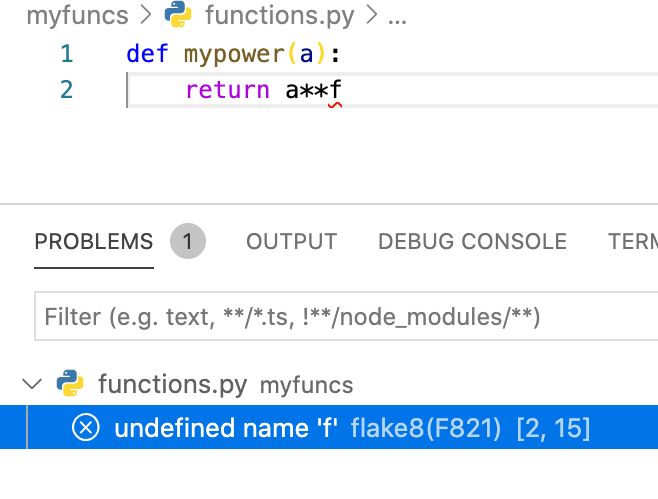
Simplest packaging 2
Upside of this approach: easy
from functions import mypower
Downside of this approach:
- it works only locally, or you need to put the file where python can find it.
Messy solution: use PYTHONPATH
Simplest packaging 3
Directly in your shell, or e.g. your .bashrc:
export PYTHONPATH=/path/where/file/is:$PYTHONPATH
Or in python:
import sys.env
sys.path.insert(0, '/path/where/file/is')
But don't do that!
Better packaging
Make a package that can be installed
Basic idea:
setup.pyinstalls the packagemyfuncs__init__.py...- ... just needs to exist for python to realize that this folder is a package
- ... is called whenever you import the package
- ... can take care of 'arranging' the name space (see later)
- ... could also contain the code in a simple case with no other files in the
myfuncsfolder
/-|
  |- myfuncs/
  |  |- __init__.py
  |  |- functions.py
  |
  |- setup.py
Even better
/-|
  |- myfuncs/
  |  |- __init__.py
  |  |- functions.py
  |
  |- docs/
  |  |- ...
  |
  |- tests/
  |  |- ...
  |
  |- setup.py
  |- README.md
  |- LICENSE
  |- MANIFEST.in
|- requirements.txtREADME- is typically a
.mdor.rst - is shown on the github website
- can be included in the package description (see
setup.py)
- is typically a
LICENSE- choose your license (github or creative commons have help pages to pick a license)
- is common but not required afaik
requirements.txt- is a simple requirements file, can also use
environment.yml is just a text file containing required packages, e.g. containing:
  matplotlib>=1.5.1
  numpy
  scipy=0.17.0
  -e git://github.com/birnstiel/XYZ.git#egg=XYZ
- is a simple requirements file, can also use
MANIFEST.in
is used to announce which files should be part of the package. Python files are included automatically, so here ourMANIFEST.inshould containinclude Readme.md include LICENSE include doc/notebook.ipynb
setup.py
from packaging.python.org:
import setuptools

with open("README.md", "r", encoding="utf-8") as fh:
    long_description = fh.read()

setuptools.setup(
    name="example-pkg-YOUR-USERNAME-HERE", # Replace with your own username
    version="0.0.1",
    author="Example Author",
    author_email="author@example.com",
    description="A small example package",
    long_description=long_description,
    long_description_content_type="text/markdown",
    url="https://github.com/pypa/sampleproject",
    packages=setuptools.find_packages(),
    classifiers=[
        "Programming Language :: Python :: 3",
        "License :: OSI Approved :: MIT License",
        "Operating System :: OS Independent",
    ],
    python_requires='>=3.6',
)
My example
note: here we include package data and we set an entry point for a console script. So after installing this package, the command myfuncshello is available from the command line.
IPython.display.Code(filename='../setup.py')
"""
Setup file for package `myfuncs`.
"""
from setuptools import setup
import pathlib

PACKAGENAME = 'myfuncs'

# the directory where this setup.py resides

HERE = pathlib.Path(__file__).absolute().parent

# function to parse the version from


def read_version():
    with (HERE / PACKAGENAME / '__init__.py').open() as fid:
        for line in fid:
            if line.startswith('__version__'):
                delim = '"' if '"' in line else "'"
                return line.split(delim)[1]
        else:
            raise RuntimeError("Unable to find version string.")


if __name__ == "__main__":

    setup(
        name=PACKAGENAME,
        description='my helper functions',
        version=read_version(),
        long_description=(HERE / "README.md").read_text(),
        long_description_content_type='text/markdown',
        url='https://github.com/birnstiel/' + PACKAGENAME.lower(),
        author='Til Birnstiel',
        author_email='til.birnstiel@lmu.de',
        license='GPLv3',
        packages=[PACKAGENAME],
        package_data={PACKAGENAME: [
            'data1/data.txt',
            'data2/data.txt',
        ]},
        include_package_data=True,
        install_requires=[
            'pytest',
            'numpy'],
        python_requires='>=3.6',
        entry_points={
            'console_scripts': [
                'myfuncshello = myfuncs.script:main',
            ],
        }
    )
__init__.py
All python files in the folder myfuncs will be part of the package if a file named __init__.py exists, even if it is empty. Then our function is available as
import myfuncs.functions.mypower
you can also change this in __init__.py, for example if you put:
from .functions import mypower as fct
now there is
import myfuncs
myfuncs.fct
myfuncs.functions.myfunc
myfuncs.functions.f
it is also good practice to define the version number here
__version__ = '0.0.1'
it is also handy to define
__all__ = ['fct']
in __init__.py which tells python that a from myfuncs import * imports only those functions in the list (here just fct).
so the entire __init__.py in our example is:
IPython.display.Code(filename='../myfuncs/__init__.py')
from .functions import mypower as fct
__version__ = '0.0.2rc2'

__all__ = ['fct']
Installation
Full install
Now we can install it either by issuing (from the folder where setup.py resides:
pip install .
This will install the package into your python distribution. Effectively it copies it there, in my case
~/anaconda3/lib/python3.8/site-packages/myfuncs/
Once that is done, you can import myfuncs in python from anyhwere.
Development install
I install my packages always with:
pip install -e .
This will install the package as well, but instead of copying it will link to this folder. In my case:
~/Dropbox/python-projects/toy-package/myfuncs/
So when you change the package after the install, those changes will be there if you (re-)import myfuncs.
In the 'full install', changes will only be in your distribution if you re-install it.
PyPI
There is one more way to install this package that doesn't work yet:
pip install myfunc
To do that, we need to have a user account on the Python Package Index (pypi.org) and upload our package there.
We will do that in a moment, but for details see
To help us with this, we install twine.
To not pollute the package index, there is a testing area test.pypi.org.
To create a source distribution we can upload, we can do
python setup.py sdist
Twine can help us with some checks
twine check dist/*
It's also worth unpacking that package to see if everything was included (otherwise it was missing in MANIFEST.in):
tar tzf myfuncs-0.0.1.tar.gz